


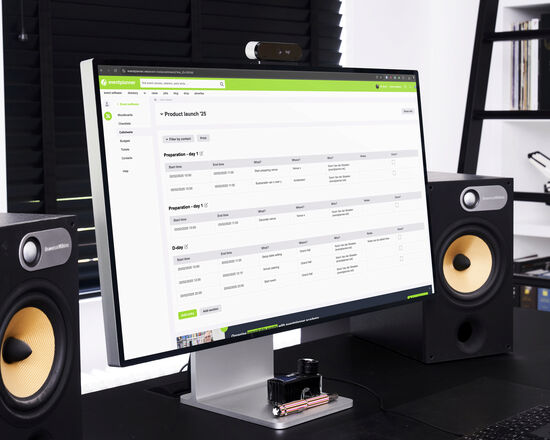
Planning an event is a complex operation with many moving parts. One of the most powerful tools professional event planners use to keep everything on track is a Call Sheet, also known as a Run-of-Show Schedule.
A call sheet is more than a timeline. It's a detailed playbook that outlines every task, who’s responsible, and exactly when things need to happen - before, during, and after the event. Whether you’re organising a corporate conference, wedding, concert, or private party, a solid call sheet ensures everyone is aligned and the event runs like clockwork.
Here's how to create an effective event call sheet, step by step. Looking for more in-depth strategies to organise flawless events? Check out our event planning book for expert tips, real-world examples, and insider tricks from professional event planners.
Step 1: Define the Scope and Timeline of Your Event
Start by determining the full scope of the event, not just the 'showtime'. Include:
- Pre-event setup: Load-in, venue prep, technical rehearsals
- Main event activities: Guest arrival, sessions, entertainment, catering timings
- Post-event breakdown: Load-out, clean-up, debrief moments
Break down the event day into time blocks (e.g., by the hour or even by 5-minute intervals for complex productions). This structure will be the backbone of your call sheet.
Step 2: List Every Task and Milestone
Go through the entire event flow and list every single task that needs to happen. Think of:
- Technical setups (A/V checks, lighting, internet)
- Vendor arrivals and briefings (catering, photographers, entertainers)
- Staff call times (security, volunteers, coordinators)
- Key program moments (presentations, performances, speeches)
- Breaks, transitions, and contingency buffers
- Post-event responsibilities (tear-down, feedback collection)
A good callsheet leaves no task unassigned and no timing ambiguous.
Step 3: Assign Responsibilities (Task Owners)
For every task, assign a clear owner. This ensures accountability and reduces confusion on event day. Each task should specify:
- Person or team responsible
- Contact details (phone number is essential)
- Check-in confirmations (e.g., who signs off when task is completed)
Pro tip: Highlight key roles (like show caller, floor manager, or tech director) so everyone knows who to escalate issues to during the event.
Step 4: Include Contact Information & Emergency Details
A professional call sheet is also a contact directory. Besides task owners, make sure to list:
- All key staff and vendors with direct phone numbers
- Venue contacts (security, on-site managers)
- Emergency services or protocols (especially for large public events)
Having this info at hand reduces scrambling for phone numbers when time is tight.
Step 5: Format for Clarity (Keep it Actionable)
A call sheet must be clear and easy to scan quickly. Use a structured format like:

Ensure the layout prioritises time order, and avoid cramming too much info into one block.
Step 6: Share and Distribute Efficiently
Once your call sheet is complete, everyone involved must have access to the latest version. Traditionally, this meant printing copies or emailing PDFs - but these methods often lead to outdated versions floating around.
Automating Callsheet Management with Event Software
Creating a call sheet manually in a spreadsheet works for small events. Still, as things get complex, it becomes a logistical headache to keep track of task ownership, last-minute changes, and sharing updates across teams.
That’s where an event call sheet tool - like the one in the eventplanner.net event software - makes life easier. Here's how using software elevates your call sheet:
- Assign ownership: Tasks can be directly assigned to team members with contact info built in.
- Live updates: Any last-minute changes (timing shifts, task reassignments) are updated in real time for everyone.
- Shareable link or mobile access: No more outdated PDFs. Everyone, from vendors to volunteers, can access the latest call sheet version from their phone.
- Task status tracking: You can tick off tasks as completed, ensuring nothing is missed.
- Centralised communication: Comments and notes stay attached to specific tasks, keeping email clutter to a minimum.
By automating your call sheet, you’re not just making a list - you’re building a dynamic event control center that keeps everyone on the same page.
Final Tip: Callsheet as Your Event's 'Mission Control'
Think of your call sheet as the central nervous system of the event. It's the document that ensures all moving parts - people, tasks, and timing - work together seamlessly. Whether you use a spreadsheet, paper, or a professional tool, what matters is that it's detailed, accurate, and accessible.
Of course, automating this process with event software gives you an undeniable edge in staying agile and organised, especially when handling larger teams or complex events.